Chantelle van Heerden

Updated 2 years ago

Master Linux with Universal USB Installer

Linux users often want to tinker with new builds move them to other machines and also have convenient backups. It?s this kind of versatility that makes Linux so attractive as an alternative operating system to Windows. Linux can even be installed to a USB flash drive that?s where the free Universal USB Installer comes in making that process as easy as 1 2 3.

Simplified Linux Installation

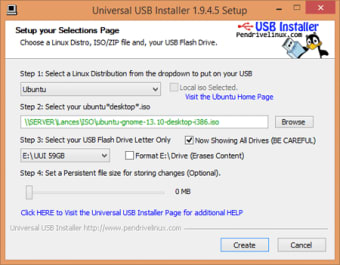
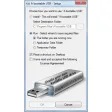
The basic idea of Universal USB Installer is exactly what it sounds like it?s a universal streamlined installer for Linux to USB. Now while it is easy it isn?t fool proof. You need a pretty good knowledge of Linux. Fortunately there are links right there on the interface to help you. Installation is just a case of picking a Live Linux Distribution the ISO file and the USB drive. This will leave you with a bootable USB. You have a few extra features like being able to format the drive first or set a Persistent file size where suitable. The process is quite quick for modern USB drives but there are a lot of ?ifs and buts? about device compatibility.

Lightweight Linux Options

Universal USB Installer is really handy if you want to backup move or experiment with Linux builds. The build is very light and the software is free. You really have all you need for this task here in one package provided your devices are compatible.

This program supports Windows 11, 10, 8, 7 Operating Systems to run UUI.

Changes

Updated to support Linux Mint 12 and Pardus Linux
Chantelle van Heerden

    With over 12 years in marketing and project management, she has led digital campaigns, events, and design projects for international clients. Alongside her agency work, she has contributed written content across multiple formats, combining professional expertise with a passion for communication and creative storytelling.

    • Pros

      • Easy three stage installation.
      • Make a bootable Linux drive.
      • Experiment with Linux builds.
    • Cons

      • Potential compatibility problems.
     0/3

    App specs

    Program available in other languages


    User reviews about Universal USB Installer

    4

    1 reviews

    Add review

    Main reviews for you

    • Anonymous user

      Universal USB Installer creates a bootable external USB drive. Universal USB Installer aka UUI is a Live Linux USB Creator that allows you to choose from a selection of Linux Distributions to put on your USB Flash Drive. The Universal USB Installer is easy to use.Simply choose a Live Linux Distribution, the ISO file, your Flash Drive and, Click Install. Upon completion, you should have a ready to run bootable USB Flash Drive with your select operating system installed. Other features include; Persistence (if available) – note that casper persistence will only work with fat16 or fat32 formatted drives.

    More

    You may also like

    Alternatives to Universal USB Installer

    Explore Apps

    Latest articles

    Laws concerning the use of this software vary from country to country. We do not encourage or condone the use of this program if it is in violation of these laws.
    Softonic

    Is Universal USB Installer safe?

    98/100

    Score result: Clean

    This file passed a comprehensive security scan using VirusTotal technology. It is safe to download.

    • Virus free
    • Spyware free
    • Malware free
    • Verified by Security Partners

      VirusTotal logo

    Scan Info

    Last scan
    Wednesday, August 2, 2023
    Scan provider
    VirusTotal · Full report

    File Integrity

    File
    Universal-USB-Installer-2.0.1.4a.exe
    SHA256
    bd22640c9044cfc8fd5a75ccfa54374591b07fc0b652b2cf0e89d69bfa945c8f
    SHA1
    07bfab2feaff157965220035ea363364c70ed7e0

    Softonic security commitment

    Universal USB Installer has been thoroughly scanned by our advanced security systems and verified by industry-leading partners. This file comes from the official developer and has passed all our security checks, showing no signs of viruses, malware, or spyware. For more information, visit our Security and Trust Center